
All too often businesses don’t consider the importance of Search Engine Optimisation (SEO) until long after their website is designed. They look all modern and shiny, but if the right SEO factors are not built in at design time, it’s a bit like running a marketing race with a wooden leg. Or at the very least, they will need to go back to the drawing board and waste a whole load of time and money redesigning everything.
In this post, we’ll look at how SEO should be an integral part of your website design process. We will consider all the main factors a site needs to optimise it for organic search marketing and lead generation. We’ll also look at how focusing on happy users helps keep the “Google gods” happy too.
We will also take a look at some of the common SEO-related pitfalls that businesses encounter when building a new website.
In brief, we will help you ensure your next site is a lean, mean and optimised digital marketing machine.
Before you call up and ask us ‘Please fix our SEO problem’, there are a few things you need to understand first. SEO is not some kind of sticky plaster you can just stick onto an existing site. Website SEO is an integral part of the way your site is designed and all the content within it. It’s fundamental to succeeding online for the majority of businesses. As well as organic search, applying good SEO techniques to your website also helps with paid search, social media advertising and any other marketing techniques. Getting it wrong means you are very likely to miss your digital marketing targets.
Developing an SEO-friendly website
At a fundamental level, an SEO-friendly site is one that allows a search engine to explore and read pages across the site. Ensuring a search engine can easily crawl and understand your content is the first step to ensuring your visibility in the search engine result pages.
A search engine utilises what is called a “web crawler” for this task, and we are trying to work with the search engines rather than against them. Unfortunately, there are many ways to make a website, and not all technologies are built with search engine optimisation in mind.
Building an SEO-friendly site requires careful planning and a structured approach to representing your business and the services you provide. For many businesses, this can be complicated — it’s not always easy to document exactly what you do.
As a marketing tool, your website should be built with a clear business model and value proposition in mind. If that’s unclear, you should work on that first.
Assuming you have all that good stuff in place, let’s dive in.
Fundamentals
There are a few key things to bear in mind for a well-optimised website.
Your business may use example.com as the primary domain, but you may have others. Ensuring your domain makes sense and relates to what you do is super-important. Ensuring that all variations and sub-domains correctly point at the main site and redirect to a single canonical version of the site is important.
Our business is (obviously!) named Enqore. We operate in the UK. We are a web-based business. It naturally follows that our domain is www.enqore.co.uk.
Firstly, you may have heard that having-my-keywords-in-my-domain.com helps. It doesn’t. It just looks stupid. It can help a little for local businesses, but ensure you are mapping to the real world. Be sensible.
The hosting of your website is also important. if your site is slow, your users won’t stay around for long. Your hosting should follow common-sense rules. ideally your website should be hosted where your target audience is situated. For us, as we operate in the UK only at present, our website is hosted with a UK hosting company on servers located in the UK. Your hosting should also be fast and even platform-specific, if necessary. 20i – the hosting provider we use – and BlueHost are both great examples, as they provide hosting tailored to WordPress websites and specifically optimised for performance of these sites.
The CMS (content management system) you choose for your business can also hugely influence how successful you are. WordPress is a great option in most situations and is what we use for all our customer sites, but it’s not the only one. It’s certainly wired up at a basic level in a way that Google can understand. This is not to say it is the best choice for all situations, but it’s a good starting point for most businesses. Just be sure that the CMS you choose is the right one for your situation, rather than the one your chosen web company prefers to work with.
Crawling & accessibility
It’s crucial to ensure a search engine can crawl your site and understand what it is that you do (and where you do it!).
To understand your site, search engines need to be able to read the content of your pages. This means that the main content of your site should be text-based. Not images. Not flash or video. Even in this ever-advancing world, your main content should still be text-based. There are some great tools – like web fonts -that mean your site can still look pretty flashy, and your images do also have a place, but be sure to write your content in clear language that explains what it is you do so the search engine can read and understand your business.
Images, videos, PDFs and other content are also important and can be a source of search engine traffic. Again, these need to be discoverable and indexable. Naming your images sensibly, based on what they show or what they are related to, is always a sensible move for good SEO. We name all of our images starting with our company name, then ending with a relevant sentence explaining what the image is trying to show. For example, an image related to our web design services might be named ‘Enqore Limited-Web Design Services.jpg’.
Google can also now understand and index the first few seconds of video, so always try to explain quickly what a video is about right at the start and again, name the video according to what it shows.
To index your content beyond the home page, you need internal links that the search engine can crawl. Your primary navigation, search engine directives and tools like XML sitemaps all help search engines crawl your site and discover all your pages. Tools like Screaming Frog can help you ensure that your site can be easily crawled by a search engine. If you’re using WordPress as your CMS, then you should also check out this plugin that can easily create an XML sitemap for you.
Information architecture and structuring your site
Let’s compare our website structure to a filing cabinet, to make it simple to understand. Your site is the filing cabinet. The major categories are the drawers. Subcategories are folders in the drawers. Individual pages are documents in the folders.
- Cabinet: your website
- Drawer: high-level category
- Folder: subcategory
- File: individual document/page
Context is indicated not only by the site it exists on but also by the position within that site. For example, our site has a drawer for Services. This is accessed from the ‘Services’ option in the top navigation menu. Underneath are the list of services which are effectively the ‘files’ in our filing cabinet analogy. We don’t actually have subcategories, but the idea is still the same.
If we consider the following structure of the Enqore site as an example:
So, there is a page in our information architecture called /logo-design/.
The /logo-design/ page exists in the Services drawer. Nice and organised. This effectively gives people context so they understand that we offer Logo Design as a Service.
This hierarchical structuring of information is relevant to blog posts, articles, FAQ content, services, products and just about anything else that is an entity within your business. You are looking to structure the information about your business in a way that makes it easily understandable and simple to find.
Some sites take a deep approach – many levels – to structuring content. Others may take a wide approach with many categories. The important thing here is that information should be organised in a way that makes sense and simplifies navigation and discovery for your users.
A three- or four-level approach like this ensures that most content can be easily navigated to within four clicks and tends to work better than a deeper approach to site navigation for users and search engines.
Context can further be indicated by the URL, that is the actual NAME given to your individual web pages. A sensible naming convention helps provide yet more context for humans and search engines alike.
Here are two hypothetical sets of URLs that could map to the Services > Logo-Design path mentioned above — one makes clear sense, and the other doesn’t.
www.example.com
www.example.com/services/
www.example.com/services/logo-design
www.example.com
www.example.com/s123/
www.example.com/s123/s1/
Of course, the second set of URLs is a deliberately obtuse example, but it helps explain the point — the first URL naming convention helps both search engines and users as it’s easy to understand in plain language, and the second one gives you no clue as to where you are in a site hierarchy.
Your website navigation is equally important. When a site is well-structured, the navigation works with the structure, the URLs and other components, like XML sitemaps, to help solidify what each page or piece of content relates to.
Navigation is more than just the menu at the top of your website. It is how you signpost users to the most relevant part of your site. Navigation can be a tool to raise awareness of additional services and includes not just text links but calls-to-action and content on all pages and in the main design elements of your site.
let’s look at a signpost analogy to explain the important of good navigation. Most people will walk into a supermarket and look for the signs to find what they need, especially if they’ve not been there before. Your website is no different. If a user searches for your business, they will – hopefully! – land on your home page. They then need clear signposts to get them to the relevant services or products they require. And it had better be easy to find of they will soon get bored and leave!
It is very easy to get this wrong, and careful thought must be applied — before you build the site — regarding the needs and wants of your users. A website is a digital component that should be clearly aligned with your marketing plan. Understanding your users and what they want is crucial so you can ensure your website meets their needs.
Navigation should be straightforward and obvious — the user should not need to think. The following image is a great example of BAD NAVIGATION from a home improvement store. Which direction takes you to the car park and which direction takes you to the deliveries entrance?
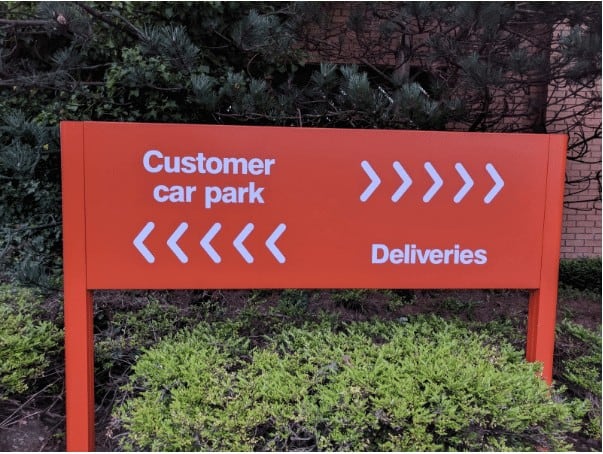
Some people will follow the “customer car park” from left to right, so would turn right. However, the customer car park is actually to the left! There is nothing there to clearly illustrate which option is right or wrong. Undoubtedly some people will get it right and some wrong, but it could be made so clearer so there was no doubt at all.
If users don’t find what they are looking for easily on a website, they will return to the great ocean of competition available via Google search.
Ensure your navigation is crystal-clear — if one user can make a mistake, many others can too.
There are many potential issues with content that can’t be found or can’t be understood by the search engine that will also work against you. For example:
- Orphaned content that can’t be found
- Content only available via site search
- Flash files, Java programs, audio files, video files
- Overly flashy site effects
- Frames — Content embedded from another site can be problematic
- Subdomains — content split into subdomains rather than sub-folders on your main website domain
Make sure that all your important content is easily discoverable, understandable and sits in the overall structure of the site in a way that makes sense.
If everything is done well, a human and a search engine should have a pretty good idea what a page is about before they even look at it.
Mobile-friendly design
The most popular device used to conduct internet searches and to browse websites is the mobile phone. We live in a mobile-first age. Sites optimised for search engines should give equal consideration to the mobile layouts of their websites, in face perhaps GREATER consideration.
In 2017, responsive design is not enough. With massive technological progress and ever-improving mobile data networks, your current and future customers will be using mobile as the first, and often only, device to interact with your business website.
To create a truly mobile-friendly design and optimise results for mobile search, you must think of the needs and wants of mobile users. What a user will do and how they interact with your site on a phone is often far different from what they do on a computer. And even if your conversions tend to be on a desktop, that crucial first touch point may well be on mobile.
From an SEO perspective, it is worth noting that mobile-friendliness is a confirmed ranking factor on Google, and it is the mobile version of your site that will be used by the search engine to review and rank your site. However, far more important, mobile is usually how your prospective customers are searching for and browsing your site.
Work hard on optimising the user experience for mobile users and you efforts will be rewarded with more traffic and better user engagement.
Page speed
Another key consideration is the speed at which your website pages load, especially as most people access the internet from their mobile phones these days. Users may be impatient, or may not always have a great data connection. Making sure your pages are lean and quick to load is a key consideration in modern SEO-friendly website design.
A great starting point is Google’s mobile-friendly test. This tool will give you feedback on mobile-friendliness, mobile speed and desktop speed. It also wraps everything up into a handy little report detailing what exactly you can do to speed things up.
Another great tool that helps you identify ways you can improve the performance of your site, one used by many professionals, is the GTMetrix site.
Usability
Web usability is a combination of various factors: device-specific design, page speed, well thought-out design and an intuitive approach to putting the site together with the end user in mind.
Key factors you should consider include:
- Page layout. Important elements should have more prominence.
- Visual hierarchy. Make more important elements bigger!
- Home page and site navigation. Clearly signpost directions for users.
- Site search. Large sites need a sensibly positioned search option.
- Form entry. Make forms as lightweight and easy to fill as possible.
- Design. Great design makes everything easier.
This is just scratching the surface here, and usability really has to be customised to each site individually.
The content marketing funnel
Your website has a hell of a job to do: it must help your business get in front of prospective customers on search engines, and then it has to engage and convert those customers.
Your site needs content to help with all of these stages of the customer journey. Content and SEO is an important combination here, as you may get in front of a customer as they look for similar services from another company they are already considering.
A structured way to consider the content you need here is a typical marketing funnel:
Awareness — top of the funnel
Awareness content will typically be your blog and informational articles. We are helping your prospective customer understand the problems they face and illustrating your experience and credibility in solving them.
- Blog posts
- Video Tutorials
- Informational articles
- Webinars
- Comprehensive guides
- FAQs
Consideration — middle of the funnel
The content at the consideration stage helps your prospect compare you against the other offerings out there. This tends to be practical content that helps the customer make a decision.
- Case studies
- Product or service information
- Product demonstration videos
- User guides
Conversion — bottom of the funnel
Bottom-of-the-funnel content drives conversions and should gently encourage a sale or lead.
- Reviews
- Testimonials
- Free trials
- Free consultations
- Free “Anything Else!”
Remember that customers will search across this entire spectrum of content types. Therefore, ensuring all of these areas are covered helps discovery via search engines, consideration and conversion.
Descriptions, Keywords and Tags
As you can see, there is a lot to consider before we even look at the more familiar elements of optimising your site and pages. We should only really start to think about keywords and basic on-page optimisation once we have this solid foundation in place. And hopefully, if we have structured everything correctly, then the actual optimisation of the pages should be pretty straightforward.
Nailing your keyword strategy is much easier once you have a well-organised site structure. If we look at our previous examples for site hierarchy and structure, then adding keywords is relatively straightforward.
{Home Page}
– Services
– – Logo-Design
www.example.com
www.example.com/services/
www.example.com/services/logo-design/
If I use these pages as an example, there is a natural progression from broader keywords to more refined terms. You might even consider including a location in the keywords if you are a local business.
– Small Business Websites
– Web Design Agency
– Web Design Company
– Web Design Services
– Logo Design
The point here is that a well-structured site makes it much easier to work out your keyword strategy. You still have to do the research and copywriting, but you can be sure you have a solid strategy to target broad and more detailed terms.
The <title> tag is the primary behind-the-scenes tag that can influence your search engine results. In fact, it is the only meta tag that actually influences position directly.
Best practice for title tags are as follows:
- Place keywords at the beginning of the tag.
- Keep length around 50 to 60 characters.
- Use keywords and key phrases in a natural manner.
- Use dividers to separate elements like category and brand.
- Focus on click-through and the end user.
- Have a consistent approach across the site.
Even in 2017, a lot of people still over-optimise their page titles. Sure, you want keywords in the title tag, but not at the expense of human readability. A search engine may rank your page better with more keywords, but a human clicks on it, so keep that in mind.
Meta descriptions don’t directly influence rankings, but are what gets displayed for a page in a set of search engine results. The meta descriptions are what get the user’s attention and get them to click through.
Your meta descriptions should:
- Truthfully describe the contents of your pages
- Advertise the page contents well to improve click-through rates
- Consider the user’s thought process and why they will want to click on this page
- Include relevant keywords, naturally written and appropriate to the content
The search engine will highlight search terms in your page title and meta description which help a user scan the page. It’s important not to ‘spam’ the meta description though, i.e. include every keyword under the sun, as Google does not look on this favourably and may well ignore it, losing you that all-important click!
In some situations it also makes sense not to create a meta description at all and simply let the search engine pull content from the page to form a description that more accurately maps to a user’s search. Your brief meta description can’t always cover all the options for a longer-form piece of content, so keep that in mind.
Heading tags help structure the page and indicate hierarchy in a document: H1, H2, H3 and so on. Text in heading tags correlates with improved rankings (albeit slightly), but what really matters is that alignment between the structure of the site, behind the scenes optimization like page titles and meta descriptions and ultimately, the content itself. Line everything up correctly and things make more sense for users, and we help search engines categorise our content and improve on-page optimisation as much as possible.
Remember to align header tags with the visual hierarchy. Meaning the most important header on the page (typically the <h1>) should also be the biggest text element on the page. You should make your content visually easy to understand, ensuring that design and content work together for the best result.
The content should generally be the most important part of the page, so make sure it is informative and of good quality. Ultimately, you want to make sure the context on your pages is clear and written naturally, so everyone can easily understand it.
Focus on creating great content that engages the user. Be mindful of keywords, but certainly don’t overdo it.
Here’s a few considerations for writing good content:
- Include relevant Keywords in the content (but don’t go overboard)
- Position of keywords in the content — earlier can be better
- Use Synonyms and alternative words to maximise the likelihood of someone finding your page, regardless of what they type
Image optimisation
Applying SEO techniques to Images can drive a substantial amount of traffic in the right circumstances. And again, context are important here. Google does not (yet) use the content of images, so context within the site and the page and basic optimisation are still most important.
Optimising your images increases the chance of them appearing higher up in the image search results, which many users will click on to go to the associated page.
Image optimization is pretty straightforward:
- Image name — Name the image appropriately, according to what it shows
- Alt text — Use a good description for the alt text that reinforces what the image shows, to help anyone who can’t see the image
- Use the image at the right physical size to ensure it loads quickly
- Optimise the image’s file size to improve loading times
Keep the images relevant to the content. Don’t go overboard with the keywords you include in the filenames and alt text. Be descriptive and concise.
Content Duplication
Duplication of content is a common problem that can lead to bad SEO rankings.
There are two main kinds of duplicate content: True duplicates and near-duplicates. True duplicates are where the same content exists in multiple places, perhaps on different pages or subdomains. Near-duplicates are where there is substantially similar content in multiple places — think of a business with multiple locations each showing the same content, or multiple products of different sizes/colours each with the same descriptions, but on different pages.
Keyword Overuse
Keyword overuse can also be a problem and refers to the situation where multiple pages are all targeting the same keywords. This can confuse search engines and means you won’t have one page that strongly targets any given search term. For good keyword SEO, you should clearly define a unique set of keywords for each page and limit the amount of duplication between pages.
Rounding Up
SEO is a fairly complex topic, but the basics I’ve covered above should stand you in good stead for a reasonably optimised website. Focus on good design, clear navigation, consideration for mobile use and optimise the descriptions and keywords used in your page titles, content, meta data and image descriptions.
At Enqore, we build all our customer websites with these points in mind so you can be sure of a reasonably well-ranked website from the start.
About the Author

Ed Solman
enqore Founder and Digital Expert
Entrepreneur and Blogger. Passionate about helping people and businesses develop and grow. Daredevil sportsbike enthusiast.
Source
http://searchengineland.com/seo-website-design-everything-need-know-272899

